
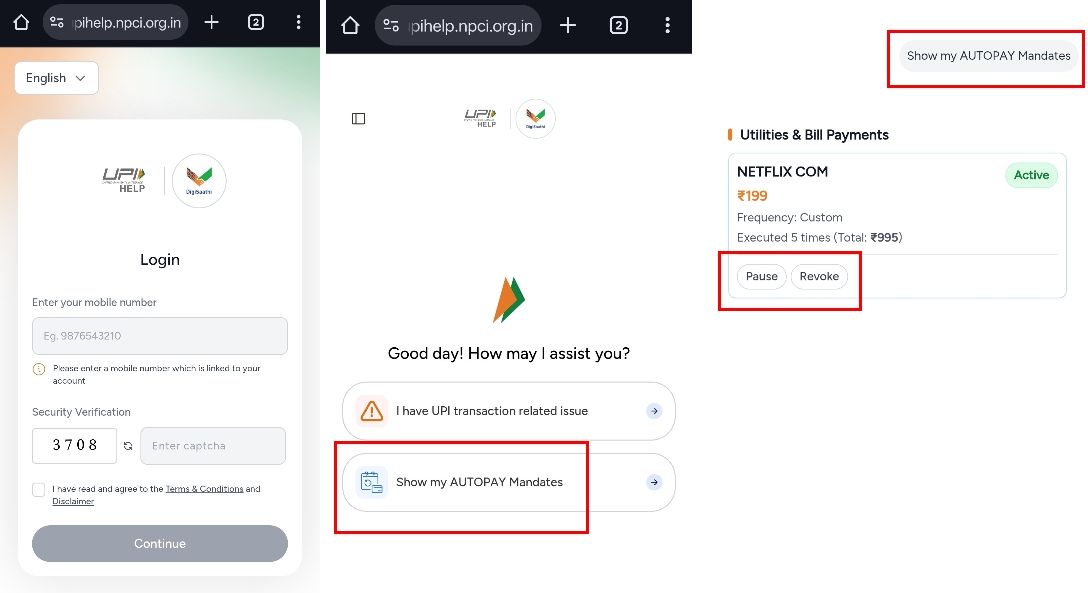
Have you ever noticed ₹199, ₹499, or even ₹999 getting deducted from your bank account without any OTP or confirmation? In most cases, this isn’t fraud or hacking. It’s a forgotten UPI AutoPay mandate. Even if you uninstall an app or stop using a service, the AutoPay mandate stays active in the UPI system until you manually cancel it. This guide explains how these silent money leaks happen and how you can stop them using the official NPCI portal.
Frequently Asked Questions (FAQs)
What is UPI AutoPay?
UPI AutoPay is a feature that allows you to approve recurring payments like subscriptions, EMIs, insurance premiums, or OTT services. Once approved, the merchant can debit your account automatically as per the agreed schedule.
Why am I getting debited without OTP?
After you approve a UPI mandate, future debits do not require OTP. The bank processes the payment automatically based on your earlier authorization.
Does uninstalling an app cancel AutoPay?
No. Deleting or uninstalling an app does not cancel the UPI AutoPay mandate. The mandate remains active in the UPI ecosystem until it is revoked.
Why is this risky?
Small recurring deductions may go unnoticed. A ₹199 subscription can silently cost you over ₹2,000 a year, and multiple forgotten mandates can drain thousands of rupees annually.
Is there a single place to check all AutoPay mandates?
Yes. NPCI provides an official centralized portal where you can view all UPI AutoPay mandates linked to your mobile number, regardless of which app you used to set them up.
How do I check all active AutoPay mandates using the NPCI portal?
1. Open a browser and visit upihelp.npci.org.in.
2. Enter the mobile number linked to your bank account.
3. Verify using the 6-digit OTP sent to your phone.
4. Click on Show My AutoPay Mandates to view all active mandates.
What details will I see in the mandate list?
• Merchant Name (Netflix, LIC, Jio, etc.)
• Authorized Amount
• Frequency (Monthly, Weekly, Yearly)
• Status (Active, Paused, Expired)
How do I cancel an unwanted AutoPay mandate?
If you find a service you no longer use, note down its UMRN (Unique Mandate Reference Number). Then open your primary UPI app (Google Pay, PhonePe, Paytm), find the AutoPay or Mandates section, and use the UMRN to Revoke or Cancel the mandate instantly.
How often should I review my AutoPay mandates?
It’s a good practice to review your mandates every 2–3 months or whenever you cancel a subscription or uninstall an app.
Conclusion
UPI AutoPay is convenient, but forgotten mandates are one of the biggest causes of silent money leaks. Uninstalling an app is not enough—you must explicitly revoke the mandate. By regularly checking the official NPCI portal and cancelling unused AutoPays, you can regain control over your money and prevent unnecessary deductions. A quick audit today can save you thousands over time.